Google Ads Channel Prioritization in Performance Max: How Much Control Do You Really Get? (2026)

For years, Google Ads advertisers and PPC specialists have asked for more control and transparency over how Performance Max budgets are split. Here is how much room the new channel prioritization really gives you.
For years, Google Ads advertisers and PPC specialists have been lobbying loudest for one thing when it comes to Performance Max campaigns: more control and transparency over how the budget is distributed.
Since its launch, PMax has been Google's biggest “black box”: you put in the budget and the creative assets, and the algorithm splits the money at its own discretion between Search, YouTube, Gmail, Maps, Discover, the Display Network and search partners. Until now, spend could only be partially steered with technical workarounds (for example, by narrowing by device).
Now the long-awaited Channel Prioritization and Budget Allocation feature has appeared in Google Ads accounts. But did we really get the reins we were waiting for? Let's look at how it works in practice and what reality shows in our own accounts.
How does channel prioritization work in PMax?
The core of the new feature is that the surfaces covered by the campaign can be split into two tiers: High priority and Low priority. On top of that, you can set a percentage-based maximum daily spend cap (Max daily budget %).
The setting is available in two places:
- Account level (Account settings > Prioritization): as a global default rule for all PMax campaigns.
- Campaign level (Campaign settings > Channel prioritization): where you can choose whether the campaign inherits the account-level settings (“Use account settings”) or gets fully custom priorities and spend limits (“Customize for this campaign”).
In theory the logic is sound: the algorithm first tries to spend the budget on high-priority channels and only moves to low-priority surfaces when there is not enough relevant reach on the high-priority ones for your goals. The percentage cap set on low-priority channels ensures these surfaces don't take more than a defined share of the daily budget.
The professional reality: why does it feel a bit like a token gesture?
When we first saw the news about channel prioritization, many of us hoped we could finally adjust PMax's internal proportions: for example, hold back YouTube in a lead generation campaign, or control the split between Gmail and Discover.
In reality, when you open the setting in a PMax campaign, you find these three channels:
- Google channels (Discover, Gmail, Google Search, Maps, YouTube)
- Search partners
- Google Display Network
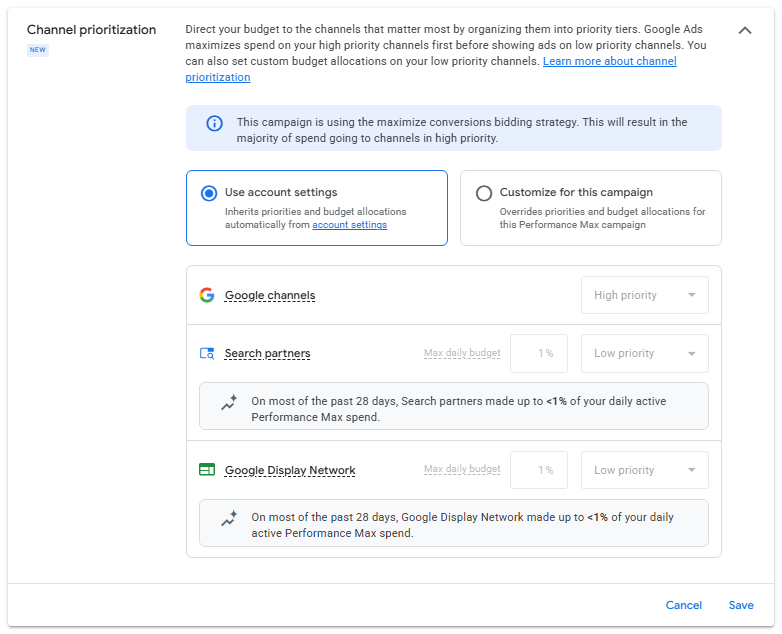
And this is where it becomes clear why, in practice, I see this change as a bit of a token gesture:
1. The internal ecosystem is still one closed block
Google channels includes Google Search, YouTube, Gmail, Google Maps and Discover. These still form a single, inseparable block. You cannot tell PMax to send 80% of spend to pure Search and at most 20% to YouTube or Discover. Meaningful, in-depth control would have been the ability to regulate spend within this inner circle.
2. The channels you can limit barely spent anything to begin with
Search partners and the Google Display Network can indeed be reined in (for example with a 1% or 5% daily cap). The thing is, in most well-performing Google Ads accounts these networks never took a meaningful amount anyway.
When you set the limit, the Google Ads interface itself points to this reality with a small note:
“On most of the past 28 days, Search partners made up to <1% of your daily active Performance Max spend.”
“On most of the past 28 days, Google Display Network made up to <1% of your daily active Performance Max spend.”
In other words, Google has given us an elegant slider to limit two external channels that, at best, already accounted for less than 1% of our campaign spend.
So what is the feature good for?
Although the breakthrough level of control didn't arrive, it would be unfair to label the update completely useless. In two specific situations it works as a genuinely useful safety net:
1. A safety brake against Display spikes:
Sometimes a PMax campaign – especially when scaling or after a more aggressive budget increase – suddenly starts spreading money across lower-quality Display or app placements. If you set GDN to low priority with a 1–5% daily limit, the campaign can't drift towards unwanted traffic.
2. More transparent behavior on search partners:
If clicks from search partners previously brought low conversion rates or questionable-quality leads, you can now hold them back without disrupting the campaign's core machine learning.
Technical details to keep in mind
If you set up channel prioritization in your PMax campaigns, keep a few important points from the official help documentation in mind:
- Best-effort behavior: The percentage cap is not set in stone. Google's algorithm aims to respect the limit, but on busier days or during sudden demand spikes it may exceed the set spend cap.
- How tCPA and tROAS campaigns behave: If your campaign runs on a Target CPA or Target ROAS bid strategy, the system's primary focus remains hitting the return target you set. The channel priority level (High vs. Low) on its own theoretically won't drastically change bidding, but the percentage spend cap set on low-priority channels is still enforced.
Summary and recommendations
Google Ads channel prioritization and budget allocation is a welcome but limited tool in the Performance Max arsenal.
It doesn't solve PMax's core dilemma – we still can't influence the closed spend logic between Google's own channels (Search, YouTube, Gmail, Discover). At the same time, it works great as a risk management and safety net feature: review the setting in your accounts and set the Display Network and search partners to low priority with a reasonable percentage cap (e.g. 1–20%). You won't lose money with it, but it can protect your account from unexpected traffic swings.
Sources and official documentation:
- Search Engine Land: Google Ads introduces channel prioritization and budget allocation controls (Anu Adegbola, October 14, 2026) — https://searchengineland.com/google-ads-introduces-channel-prioritization-and-budget-allocation-controls-495946
- Google Ads Help: About channel prioritization and budget allocation — https://support.google.com/google-ads/answer/18385152?hl=en